

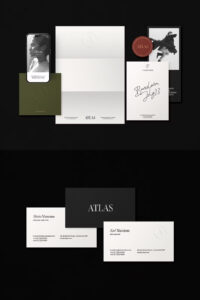
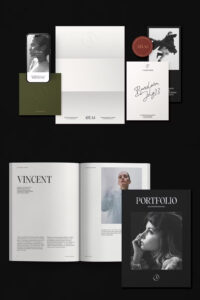
Introducing ATLAS Branding Mockup Kit, the ultimate high-resolution branding mockup set for **Adobe Photoshop**. Designed for professionals, this versatile collection allows you to showcase your branding projects **across multiple formats**, from business cards to magazines, envelopes, and digital devices.
With 24 pre-made scenes, **3 main scene creators**, and **customizable smart objects**, this kit gives you everything you need to create stunning presentations effortlessly.
What’s Included in the ATLAS Mockup Kit?
This extensive set covers a wide range of branding materials, ensuring you have the **perfect mockup for every project**:
Paper & Stationery Mockups
- A4, A4 Landscape, A4 Folded
- US Letter, US Letter Landscape, US Letter Folded
- A5, A5 Landscape
- Half Letter, Half Letter Landscape
- 5″ x 7″, 5″ x 7″ Arch, 5″ x 7″ Double Arch Card
- 7″ x 5″, 7″ x 5″ Arch Card Landscape
- 5″ x 5″ Circle Card, 5″ x 5″ Square Card
- 4″ x 9″ Card, 9″ x 4″ Card
- Pantone Card
Business Cards & Magazine Mockups
- Business Cards: 85 x 55 mm, 85 x 55 mm Landscape, 3.5″ x 2″, 3.5″ x 2″ Landscape, 65 x 65 mm
- Magazine Covers & Spreads: A4, US Letter, A4 Landscape, US Letter Landscape
✉️ Envelope Mockups
- DL Envelope, C4 Envelope, A5 (Postcard), 4″ x 9″ Envelope, 9″ x 4″ Envelope
Device Mockups
- iPhone 14 Pro
- iPad Pro & iPad Pro Landscape
- MacBook Air
- iMac
✨ Features & Benefits
- ✅ High Resolution – 4000x2667px, 300 DPI for crystal-clear visuals.
- ✅ 24 Pre-Made Scene Mockups – Ready-to-use layouts for quick branding presentations.
- ✅ 3 Main Scene Creator Mockups – Papers, Magazines & Envelopes, and Devices.
- ✅ 8 Unique Background Textures – Choose from a variety of textures for added realism.
- ✅ 12 Shadow Overlays – Enhance depth and dimension in your designs.
- ✅ Smart Object Editing – Easily insert your designs with **just a few clicks**.
- ✅ Changeable Background Colors – Fully customizable backgrounds to match your brand identity.
- ✅ Well-Ordered Layers – Easy navigation for smooth workflow.
- ✅ Help Guide Included – Step-by-step PDF guide for easy setup.
How to Use the ATLAS Mockup Kit
- Open the mockup file in **Adobe Photoshop**.
- Double-click the **Smart Object layer**.
- Insert your **design, logo, or branding**.
- Save the file and watch your **mockup come to life!**
Why Choose ATLAS Branding Mockups?
ATLAS Mockups are not just visually stunning—they are also **incredibly easy to use**. Whether you’re creating **brand presentations, portfolio pieces, or client mockups**, this kit will **elevate your projects with a professional, high-end look**.
⚠️ Important Notes
- Templates & photographs from previews are NOT included.
- ️ Requires **Adobe Photoshop (not compatible with Canva or Procreate)**.
- Files are provided via **Google Drive download link**.
License & Support
For more details on licenses, visit Creative Market License Information.
Need help? **Contact us at daralight.studio@gmail.com** for assistance.
Download the ATLAS Branding Mockup Kit Now!
Take your branding projects to the next level with this **high-quality, fully customizable mockup set**. Click below to get **instant access** and start creating professional branding mockups today!





Leave a Comment